Every Clabrate action is bound to a keyboard shortcut, and every one of them is rebindable — including the boards overlay, which used to be the one exception (see below). If the defaults don’t fit your hands or clash with another app, change them in Settings → Keys.
The default shortcuts
| Action | Default | What it does |
|---|---|---|
| Dictate | right ⌥ Option | Hold or tap to dictate at your cursor |
| Assistant / Chat | right ⌘ Command | Ask the AI assistant by voice |
| Transform | ⌘⇧T | Rewrite selected text in place |
| Overlay | ⌘⇧O | Show or hide the boards overlay |
| Copy last dictation | unbound | Re-copy your most recent dictation |
Extensions can add shortcuts of their own. Turn on Window Snap (Settings → Add-ons) and fifteen window-placement shortcuts appear in their own card — unbound until you set them, and rebindable like everything else. (More on what they do in Put the browser on the left.)
Rebinding a shortcut
- Open Settings → Keys.
- Click the shortcut field for the action you want to change.
- Press the new key or combination. Clabrate captures it live and swaps it in immediately — no restart needed.
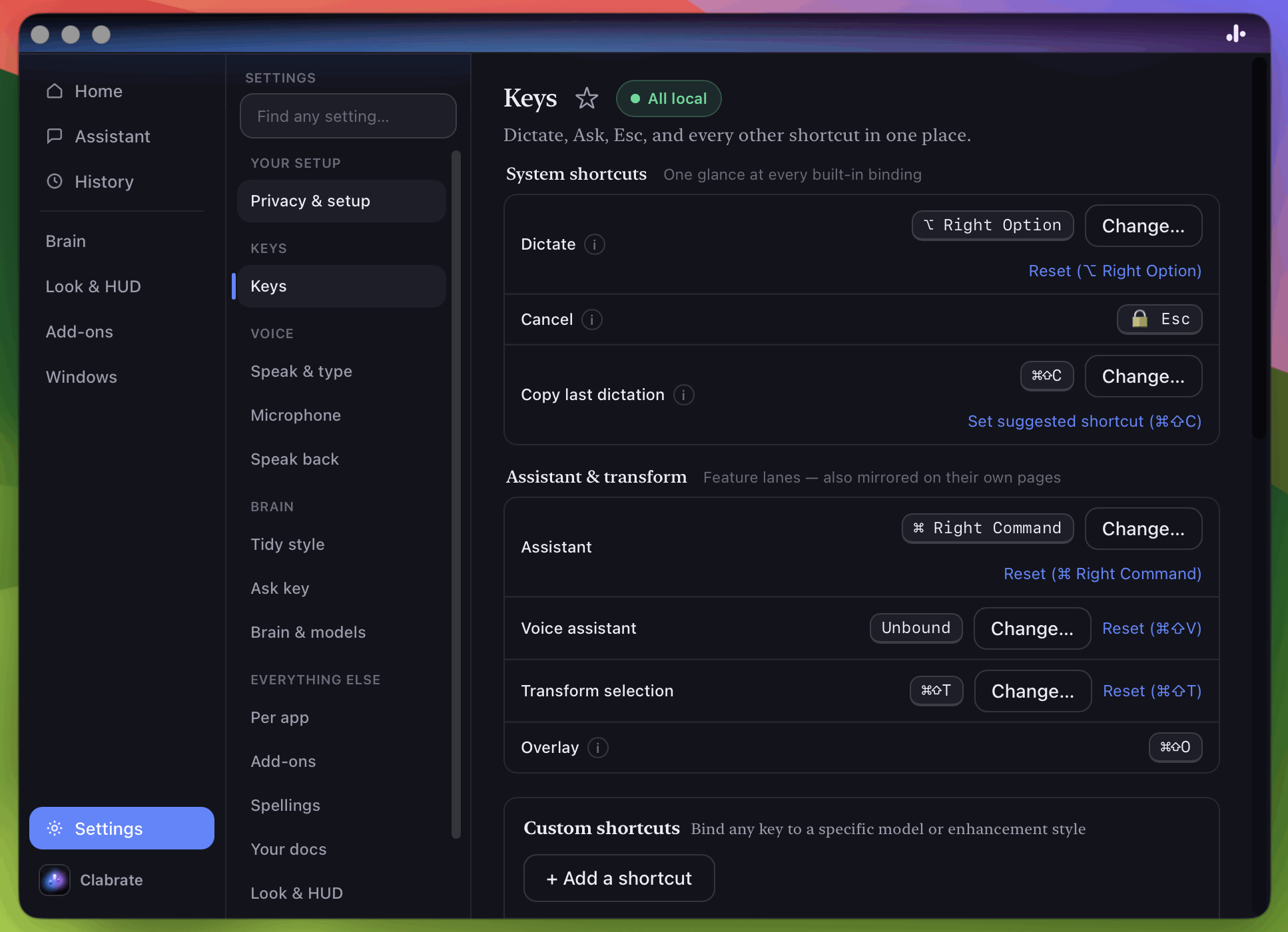 Screenshot pending: shortcuts-settings.png
Bare-modifier keys
Like the default dictation key, any Clabrate shortcut can be a single “bare” modifier held on its own — for example binding the assistant to hold right ⌘ Command. This keeps your shortcuts out of the way of normal typing while staying fast to reach.
Note: The Fn (Globe) key is reserved by macOS and can’t be used as a Clabrate shortcut.
The overlay and Xcode’s Open Quickly
While Clabrate is running, its global ⌘⇧O takes precedence over Xcode’s Open Quickly — and over any other app-local ⌘⇧O. The overlay row in Settings → Keys fixes this two ways:
- Change… moves the overlay to a chord you aren’t using, or
- Clear unbinds it entirely, handing ⌘⇧O straight back to Xcode.
Clearing it is a real, supported state, not a broken one: the overlay has no shortcut afterwards, and you open it from the menu-bar ✨ icon → Overlay → Show Overlay (or just ask the assistant). Reset puts ⌘⇧O back whenever you want it.
Esc always cancels
Whatever you’ve triggered — dictation, a transform, the assistant — pressing Esc cancels it cleanly. Nothing is inserted and nothing is sent.
Common questions
Can two actions share a key? No — each binding must be unique. Clabrate will flag a conflict when you try to assign one that’s already in use.
My new shortcut clashes with another app. Pick a different combination, or use a bare-modifier key, which rarely collides.
How do I unbind something? Clear the field in Settings → Keys. (Copy-last-dictation ships unbound by default.)
Troubleshooting
- A shortcut stopped firing. Confirm Input Monitoring is still granted in System Settings — see Troubleshooting.
- A bare modifier feels twitchy. Make sure you’re holding it on its own; pressing it together with another key is read as a normal keystroke.