Enhancement polishes text as you dictate it. Transforms do the same job for text that already exists — anywhere on your Mac. Select it, press a key, and Clabrate rewrites it in place.
How it works
- Select the text you want to change, in any app.
- Press ⌘⇧T (the Transform shortcut).
- Choose how to rewrite it. Clabrate replaces your selection with the result.
Because it edits your selection directly, there’s no copy-paste shuffle — the rewritten text lands exactly where the original was.
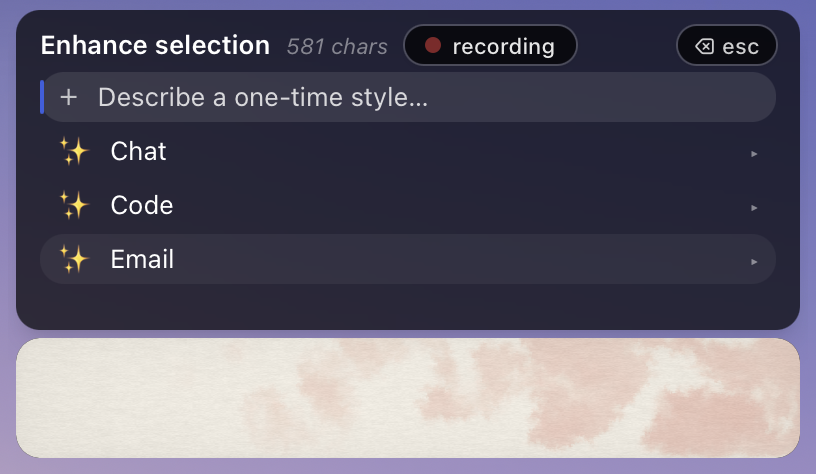 Screenshot pending: transform-style.png
One-time spoken style
Beyond the saved presets, you can describe the rewrite you want out loud, just for this one transform. When the style picker opens it keeps your microphone live so you can say something like “make this more concise and friendly” — then confirm to apply it. There’s a 60-second cap on the spoken instruction.
Tip: One-time styles are perfect for the rewrites you’d never bother saving — “turn this into a bulleted list,” “make it sound less stiff,” “translate the tone to a quick Slack message.”
Common questions
How is this different from enhancement? Enhancement runs while you dictate new text. Transform rewrites text that’s already there.
Which model does the rewriting? Whichever model profile you’ve selected — on-device by default, or a cloud provider if you’ve chosen one. See Models & providers.
Can I undo it? The transform replaces your selection; use your app’s normal Undo (⌘Z) to revert.
Troubleshooting
- Nothing was replaced. Make sure text is actually selected first, and that Accessibility is granted so Clabrate can edit in that app — see Troubleshooting.
- The spoken style didn’t take. Confirm before the 60-second cap, and check your microphone in Microphone & audio.